HR Platform

One platform for the whole employee lifecycle.

From the business case that justifies a role, through hiring and onboarding, to the day someone leaves — one continuous record, and an approval trail behind every decision.

The Problem

Most HR work happens outside the HR system.

Emails, spreadsheets, and WhatsApp groups are doing the heavy lifting. HR AIVA brings it all into one place.

No audit trail

Who approved this role, at what salary, and when — reconstructed from inboxes.

The record breaks at "hired"

Everything gathered during recruitment is stranded in the recruitment tool.

Scheduling is invisible

Nobody can answer 'is anyone covering Sunday night?' without asking someone.

Compliance is manual

Rest gaps, overtime and clearance checklists depend on somebody remembering.

Why HR AIVA

Everything your HR team needs. Nothing they don't.

Hire to Retire

Every stage from business case to exit in one connected record.

Org Structure

A living hierarchy from head office to individual positions.

Shift Scheduling

Visual rotas with compliance checks built in — no more WhatsApp groups.

Approval Chains

Configurable multi-step approvals with full audit trail.

AI Resume Scoring

Automatic ranking against role criteria with manipulation detection.

Self-Service Portals

Candidates and employees complete tasks in their own space.

12

Lifecycle Stages

9

User Roles

4

Approval Chains

5

Integrations

100%

Audit Coverage

The Platform

Twelve modules. One record.

Each module feeds the next. Nothing is re-entered, nothing is lost.

01

Business Cases

Prove the role is worth funding — before it exists.

A business case carries the problem statement, the headcount per location and the cost, then walks a six-step approval chain in which only the Rewards team can touch the money.
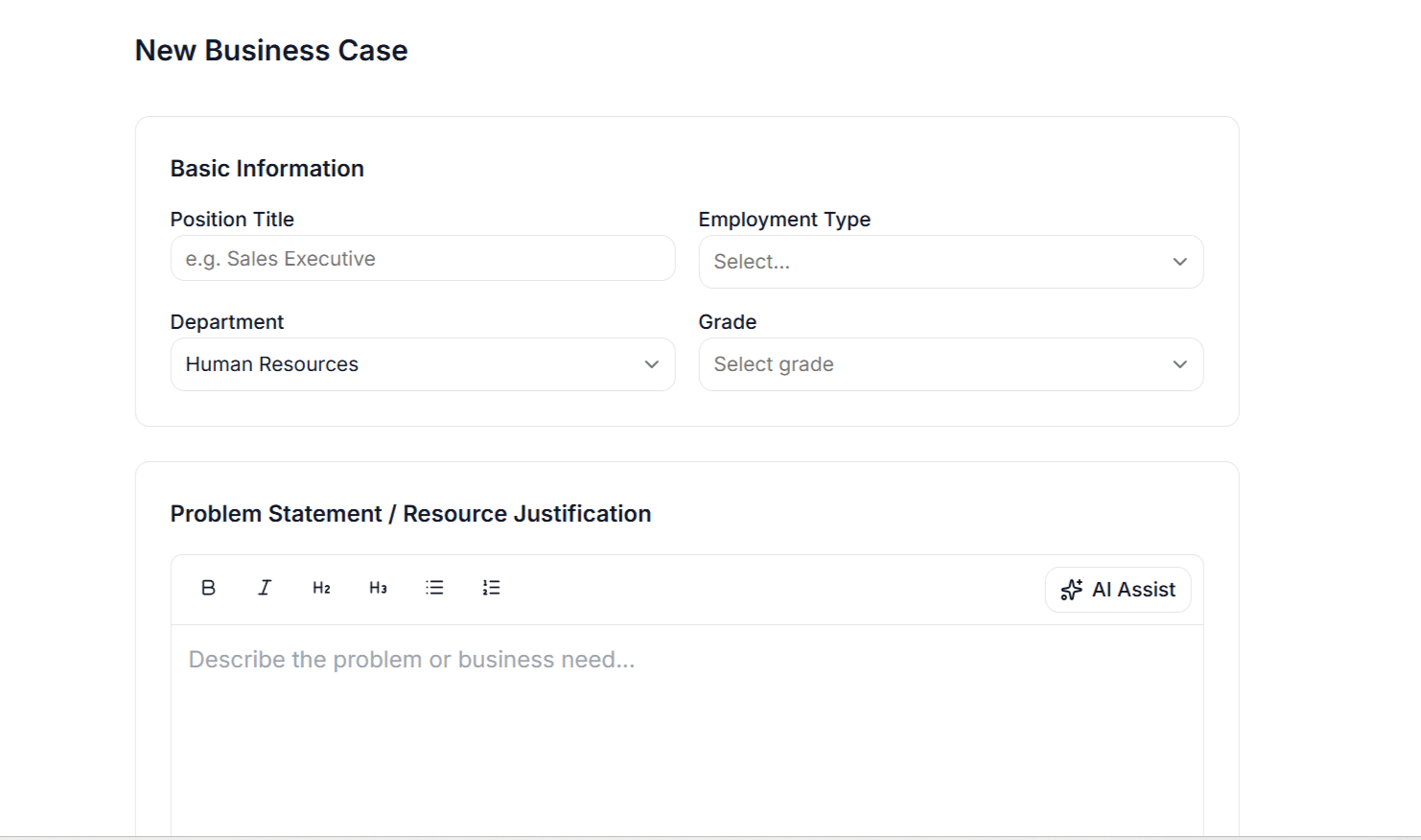
  • Per-location allocations with monthly and annual CTC
  • Cost figures editable only at the three Rewards stages
  • Rejection returns it one step and requires a written reason
  • Full timeline: who acted, when, and what they said
Business Cases — HR AIVA
02

Hiring Requests

Turn an approved budget into a live vacancy.

The requisition references its approved business case, so the money and the role can never drift apart. Once it clears its own chain it converts straight into a job opening.

  • New or replacement, tied to the approved case
  • Grade, personal area, employment type, location, matching criteria
  • Sent back for revision returns to the originator, not to square one
  • Converts to a job opening with every field pre-filled
Hiring Requests — HR AIVA
03

Job Openings & Careers

Publish once, reach everyone.

A single opening can run internally, externally or both — with a public careers site, an internal board for existing staff, and one-click publishing to LinkedIn.

  • Public careers board with a branded application form
  • Internal-only postings employees browse and apply to
  • Choose which application fields appear; add custom questions
  • Unique view counts and application counts per opening
  • Close, reopen, or promote an internal role to external
Job Openings & Careers — HR AIVA
04

Applicant Tracking

Read every CV, even the four hundredth.

Applications and bulk-uploaded resumes are scored automatically against the role, so recruiters open a ranked shortlist instead of a folder of PDFs.

  • Upload resumes in bulk; each is parsed and queued for scoring
  • Weighted breakdown across skills, experience, education and format
  • Matched and missing skills listed explicitly, with a match rate
  • Strengths, weaknesses and a parsed work history per candidate
  • Flags resumes showing signs of keyword manipulation
Applicant Tracking — HR AIVA
05

Screening & Panel Review

Get the hiring panel to decide, not to meet.

Shortlisted candidates are shared with named reviewers, who record an accept or reject with their reasoning in their own time. The tally shows on the pipeline.

  • Share individually or in bulk with any set of reviewers
  • Reviewers see profile, resume and score — then decide with comments
  • Running accept / reject counts per candidate
  • Private screening notes between recruiters, editable by their author
Screening & Panel Review — HR AIVA
06

Interviews

Scheduled in the calendar people actually use.

Interviews are booked against real availability and land as Microsoft calendar invitations — a Teams link for online, a room and address for onsite. Feedback is structured, so rounds can be compared.

  • Checks panel availability before proposing a slot
  • Creates the calendar event and Teams meeting automatically
  • Structured competency and assessment ratings, one submission per panellist
  • Multiple rounds, rescheduling, downloadable feedback summary
  • Candidate experience survey sent after the process
Interviews — HR AIVA
07

Offer

The number gets approved before it gets promised.

The candidate workspace walks the offer through four steps. Documents are verified, the Rewards team builds the package, three approvers sign off — and only then can the offer be sent.

  • Documentation — candidate uploads ID, offer letter and payslips; recruiter reviews each
  • Total Remuneration — full package built across five compensation bands
  • Intent approval — AM Rewards, then Head of Rewards, then COO
  • Placement — offer emailed; candidate accepts or declines in their portal

Compensation is built in five bands rather than one salary figure, so base, guaranteed cash, incentives and benefits are each approved on their own terms.

Offer — HR AIVA
08

Medical & Joining

Paperwork done before day one, not on it.

Between acceptance and start date the new joiner completes everything in their own portal. HR watches the checklist fill in rather than chasing it.

  • Medical clearance where the role requires it
  • Code of conduct acknowledgement
  • Nominee and beneficiary forms, emergency contacts
  • Background verification and salary transfer details
  • Every document reviewable, with revision requests sent by email
Medical & Joining — HR AIVA
09

Orientation & Onboarding

A first week that was actually planned.

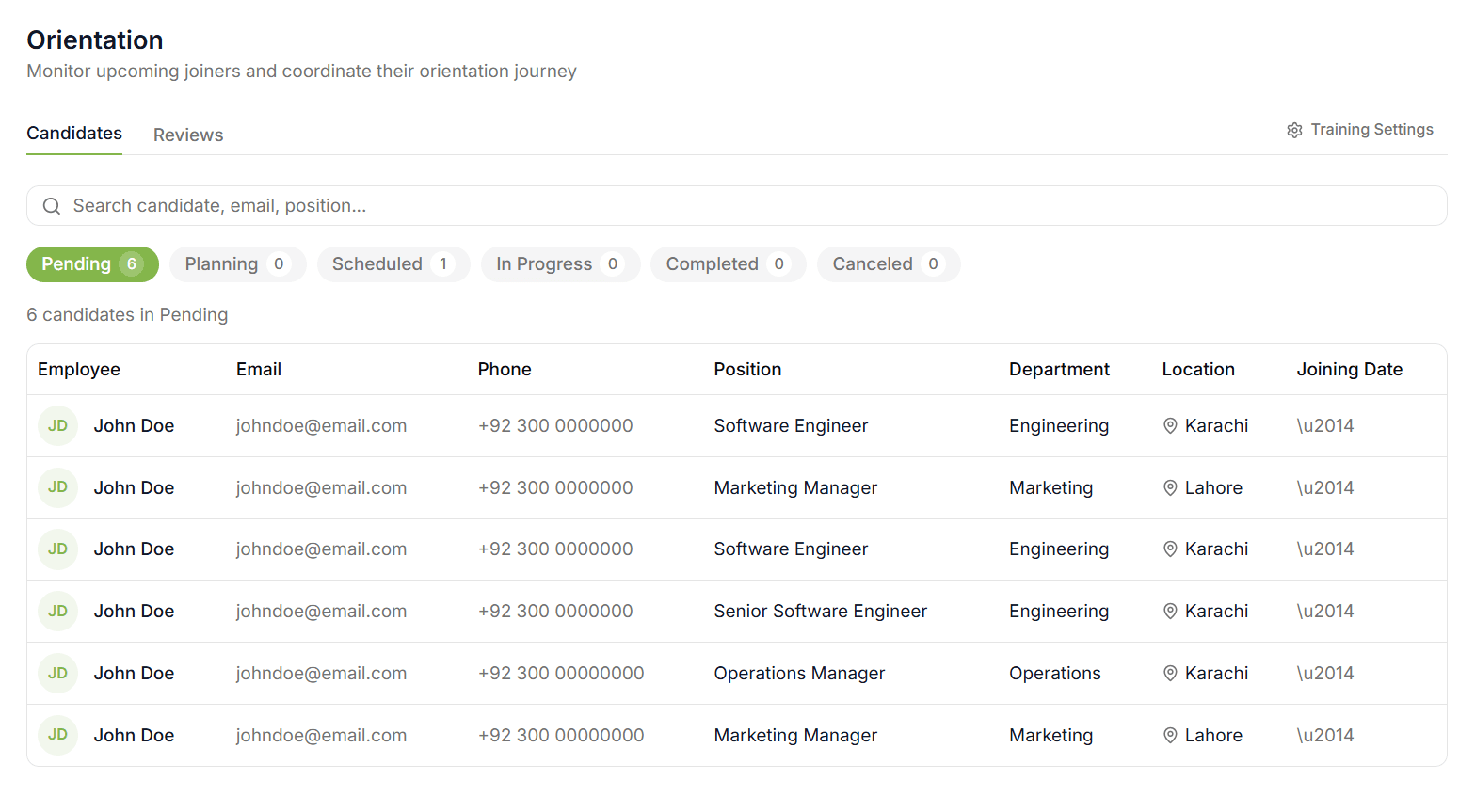
Each new joiner gets a line manager, a set of orientation sessions, and named people responsible for delivering them. Those people schedule their own slots, and the joiner rates each session afterwards.

  • Mandatory and optional training catalogues, configurable by HR
  • Line manager suggests sessions; stakeholders notified by email
  • Stakeholders pick their own slot and merge identical sessions across joiners
  • New joiner confirms attendance and rates each session on three measures
  • Employee details, equipment assignment, joining announcement to the team
Orientation & Onboarding — HR AIVA
10

Offboarding & Exit

Leaving is a process too.

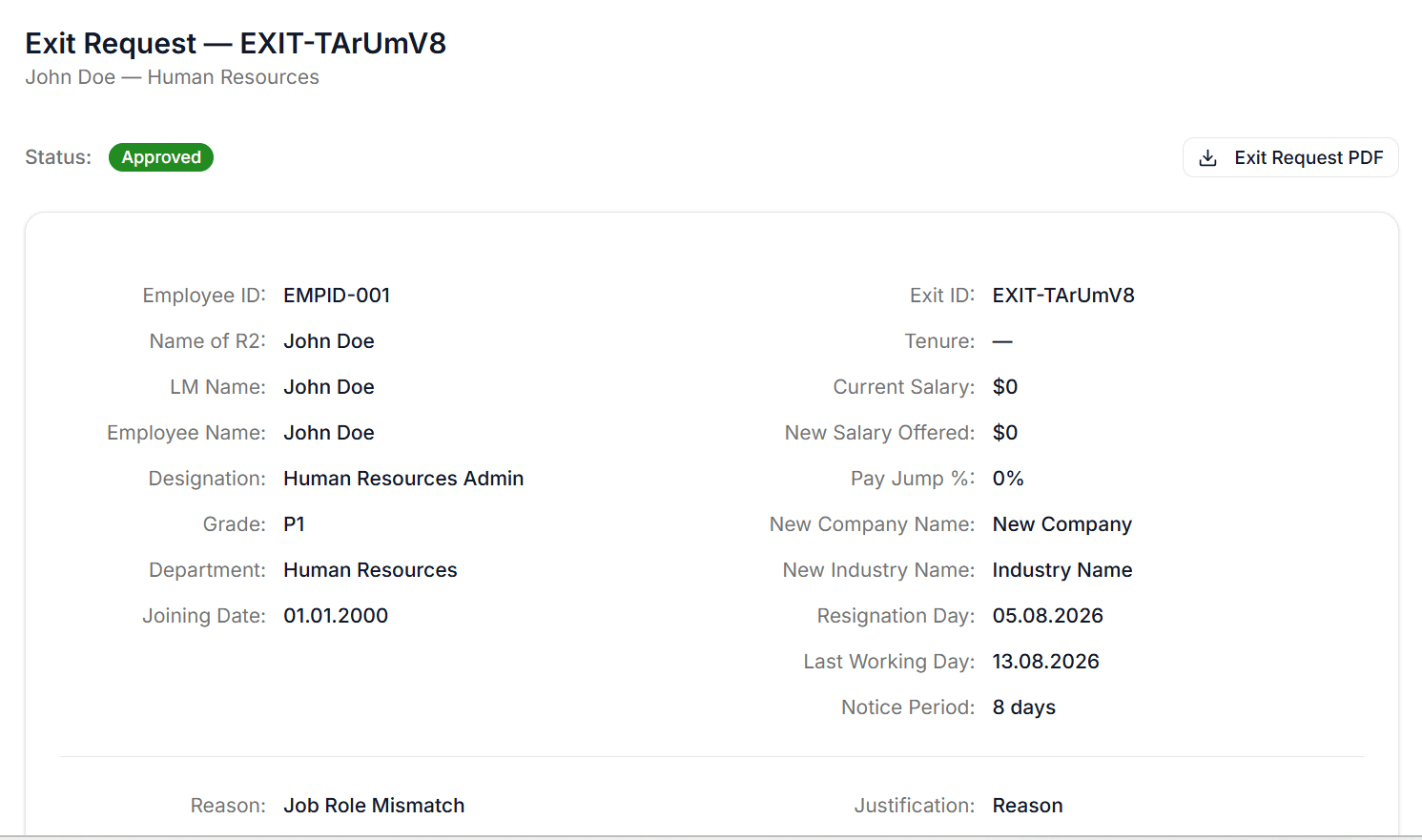
An employee raises their own resignation, or HR raises it for them. It routes through the line manager and HR, triggers a structured exit interview, and ends with departmental clearance.

  • Tenure, notice period and pay change calculated automatically
  • Withdraw at any point before final approval
  • Exit interview across culture, the job itself, and supervision
  • Clearance split by department, each section signed off by its owner
  • Exit form and interview responses exportable as PDF
Offboarding & Exit — HR AIVA
11

Organization Structure

The org chart everyone asks for and nobody maintains.

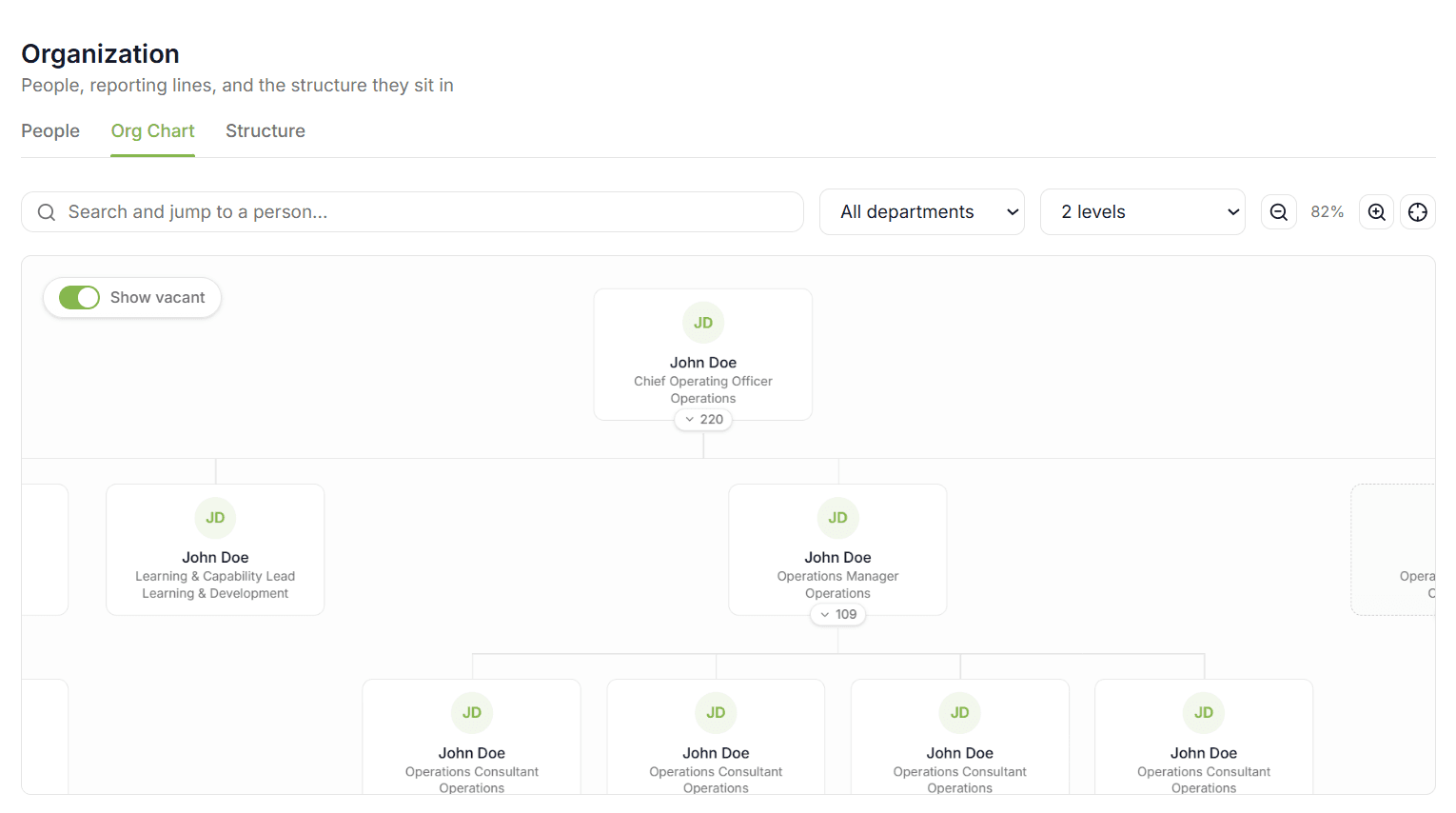
Regions, cities, restaurants and departments modelled as a real hierarchy — with every employee sitting in it. This is the backbone the rest of the platform hangs off.

  • Org units nested from head office down to individual restaurants
  • Searchable people directory with department and status filters
  • Interactive chart — drag to pan, scroll to zoom, collapse any branch
  • Vacant positions shown as open seats, so gaps are visible
  • One profile per person: personal, documents, compensation, hiring, training, exit

Headcount, filled positions and vacancies summed live. Search by name, employee ID or job title, filter by department, export the result.
Organization Structure — HR AIVA
12

Shift Management

Replace the rota on the WhatsApp group.

A weekly grid per restaurant showing who works when. Coverage is summed as you edit, and the system flags the scheduling mistakes people make when they are tired.

  • Reusable shift templates with times, breaks and net hours
  • Assign a cell, a whole week per person, or copy last week wholesale
  • Per-shift coverage totals, colour-coded against the minimum
  • Weekly hours per person, flagged as they approach the cap
  • Employees see their own week in a read-only view
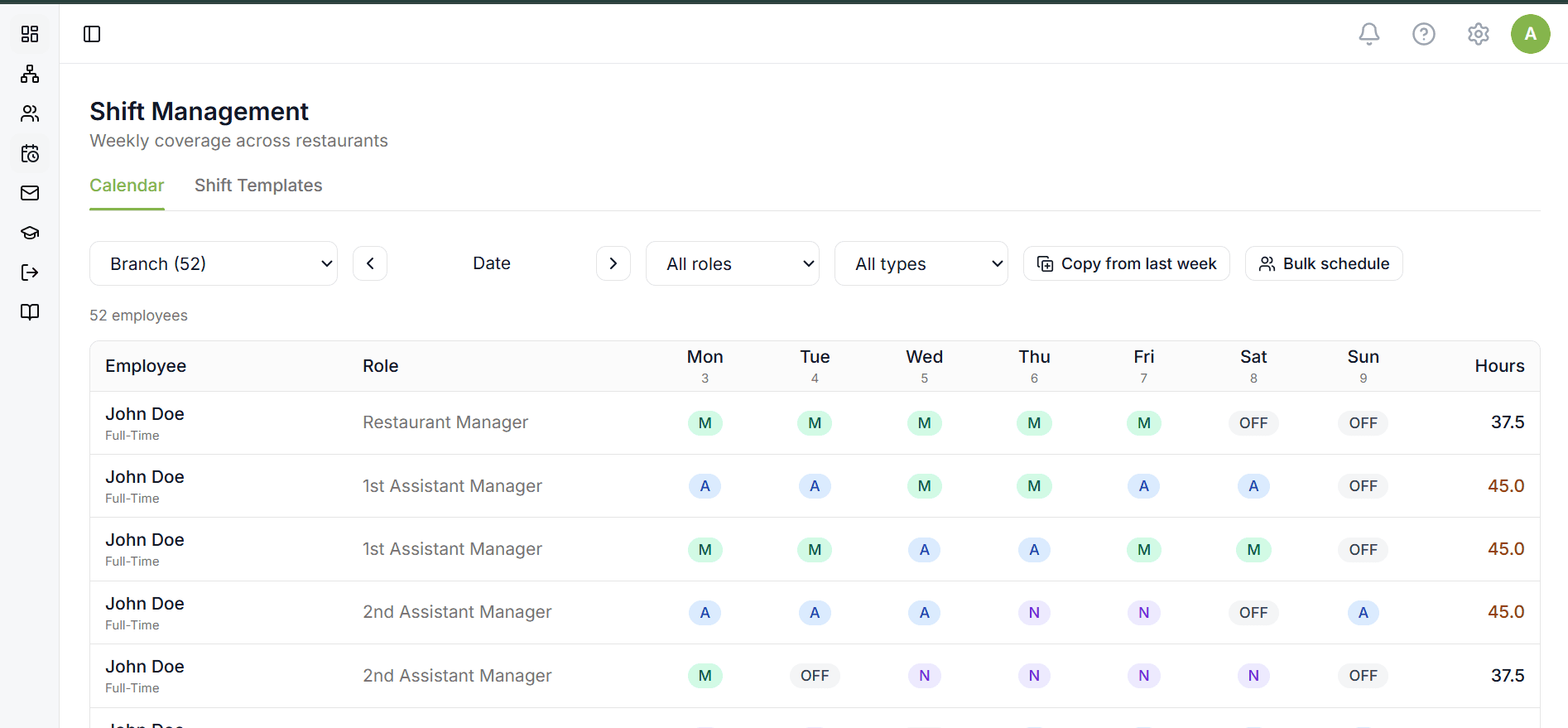
Shift Management — HR AIVA
Under the Hood

The approval chains are configuration, not code.

Stages, transitions and who may act at each one are stored as data. Every module inherits the same engine, the same permission model and the same audit trail.

Workflow Engine

Validates the actor's role, enforces required comments, records every transition.

Nine Roles

Permissions stored per role and checked per action, not per screen.

Templates

Every email and offer letter editable, with variable substitution.

Notifications

Raised automatically to whoever is next to act.

Integrations

Microsoft 365SSO · Teams · Calendar
Active DirectoryUser sync
LinkedInJob posting
Resume ScoringQueue-based AI
EmailTemplated SMTP

HRAIVA · Next.js · FastAPI

FAQ

Common Questions

Hire better.
Manage smarter.

See how one platform replaces the spreadsheets, inboxes, and WhatsApp groups your HR team is running on today.